
Xhancer: The Ultimate Browser Extension to Enhance Your X/Twitter Experience
Discover how Xhancer transforms your X/Twitter browsing with powerful features like user remarks, bookmark synchronization, browsing analytics, and more - all while keeping your data private and secure.
If you're an active X (formerly Twitter) user, you know the platform can be overwhelming. Between managing bookmarks, tracking conversations, and keeping tabs on important users, it's easy to lose track of what matters most. That's where Xhancer comes in - a powerful browser extension designed to transform how you interact with X/Twitter, making your experience more organized, productive, and insightful.
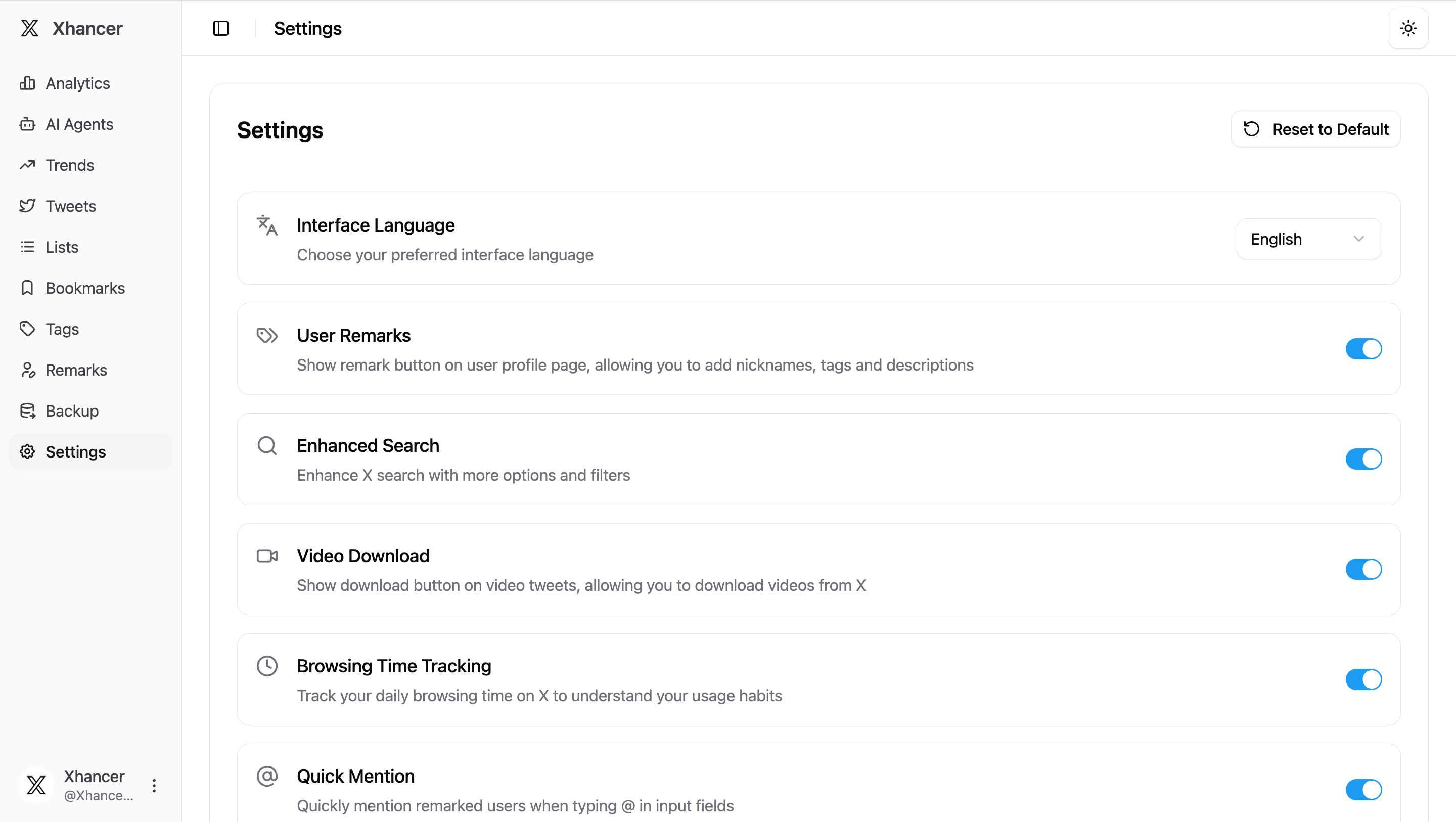
What Makes Xhancer Different
Unlike many browser extensions that promise productivity but deliver complexity, Xhancer takes a different approach. Built with privacy at its core, every piece of data you create - from user remarks to bookmark collections - stays securely on your device using IndexedDB, a powerful local database built into modern browsers. There's no cloud sync, no data sharing, and no privacy concerns. When you uninstall the extension, your data goes with it.
This privacy-first philosophy doesn't come at the cost of features. In fact, Xhancer packs a remarkable set of capabilities that address the real pain points X/Twitter users face daily.
Remember Everyone with User Remarks and Tags
Have you ever followed someone months ago and can't remember why? Or wanted to categorize users based on their expertise or relationship to you? Xhancer's remarks and tagging system solves this beautifully.
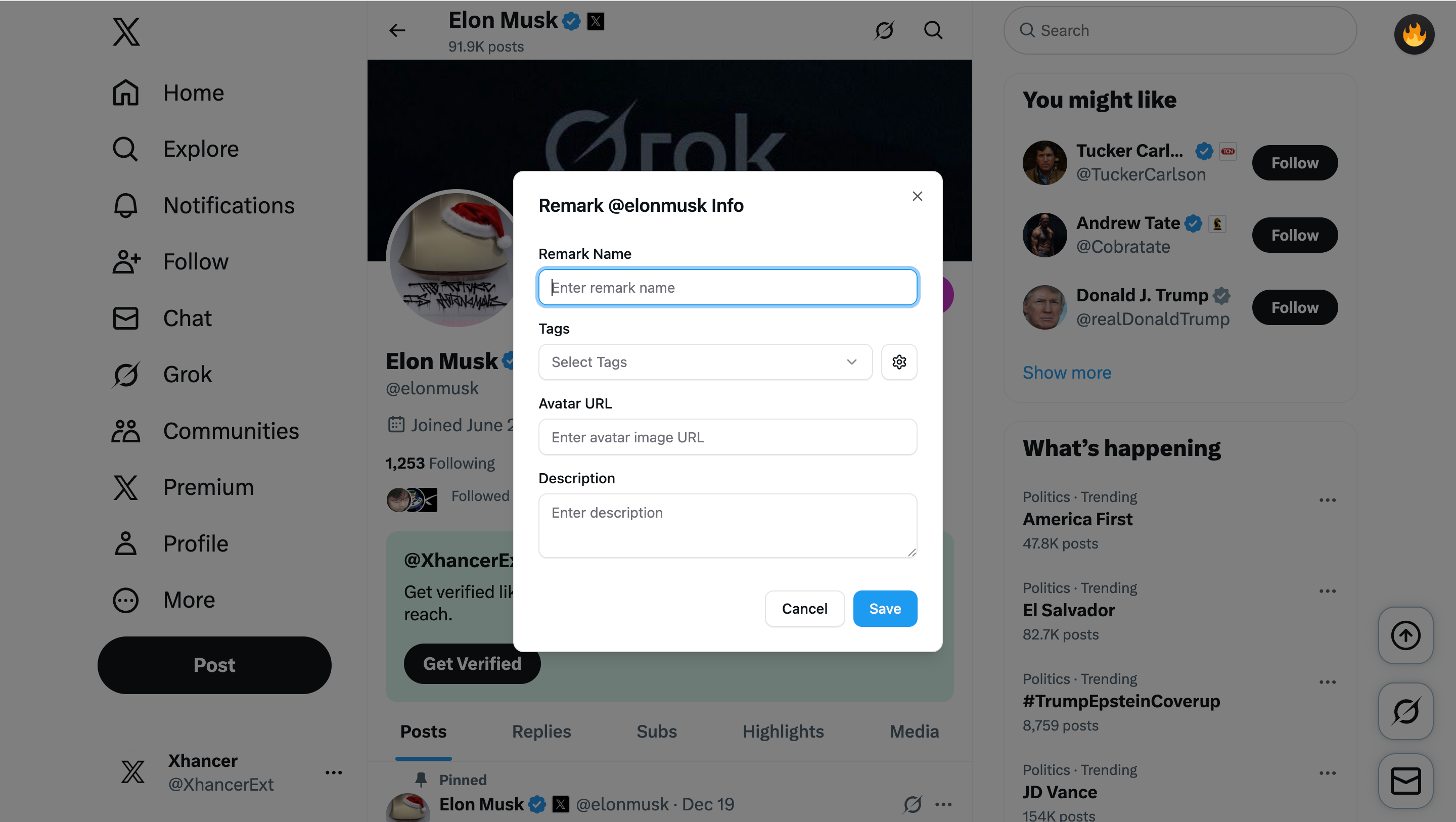
When you visit any user's profile, you can add personalized remarks - quick notes that help you remember who they are, why you follow them, or any context you want to preserve. Combine this with the flexible tagging system, and you've got a powerful way to organize your X/Twitter network. Create tags like "Tech Influencer," "Client," "Friend," or "Potential Collaboration" and assign them to users as you see fit.
The extension even supports Chinese characters with smart pinyin matching, making it effortless for Chinese-speaking users to search and filter their tagged connections. This attention to detail shows how Xhancer understands the global nature of social media.
Never Lose Track of Your Bookmarks Again
X/Twitter's native bookmark feature is notoriously limited. Finding that tweet you bookmarked three weeks ago can feel like searching for a needle in a haystack. Xhancer changes this with intelligent bookmark synchronization.
The extension automatically syncs your bookmarks to your local database, creating a searchable, organized collection. You can view all your bookmarked tweets in the Xhancer dashboard, with full metadata preserved. Better yet, bookmarks are organized per user, so if you tend to bookmark certain accounts more than others, you can easily browse by source.
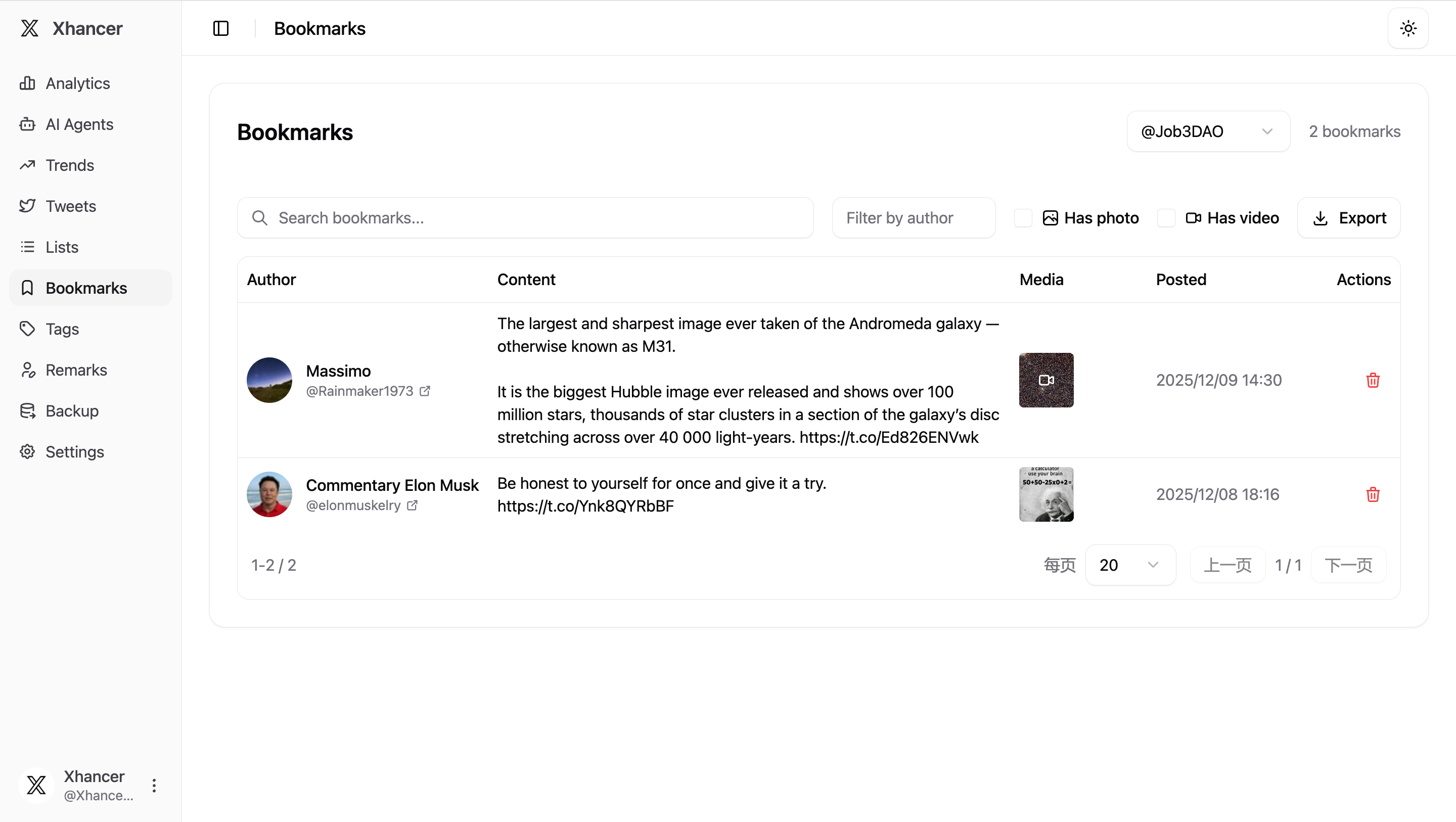
This same synchronization magic applies to your own tweets and lists. Whether you're a content creator tracking your tweet performance or someone who curates lists for specific topics, Xhancer keeps everything synchronized and accessible.
Understand Your Browsing Habits with Analytics
Ever wondered how much time you actually spend on X/Twitter? Xhancer includes a sophisticated duration tracking system that monitors your browsing sessions and presents the data in beautiful, actionable visualizations.
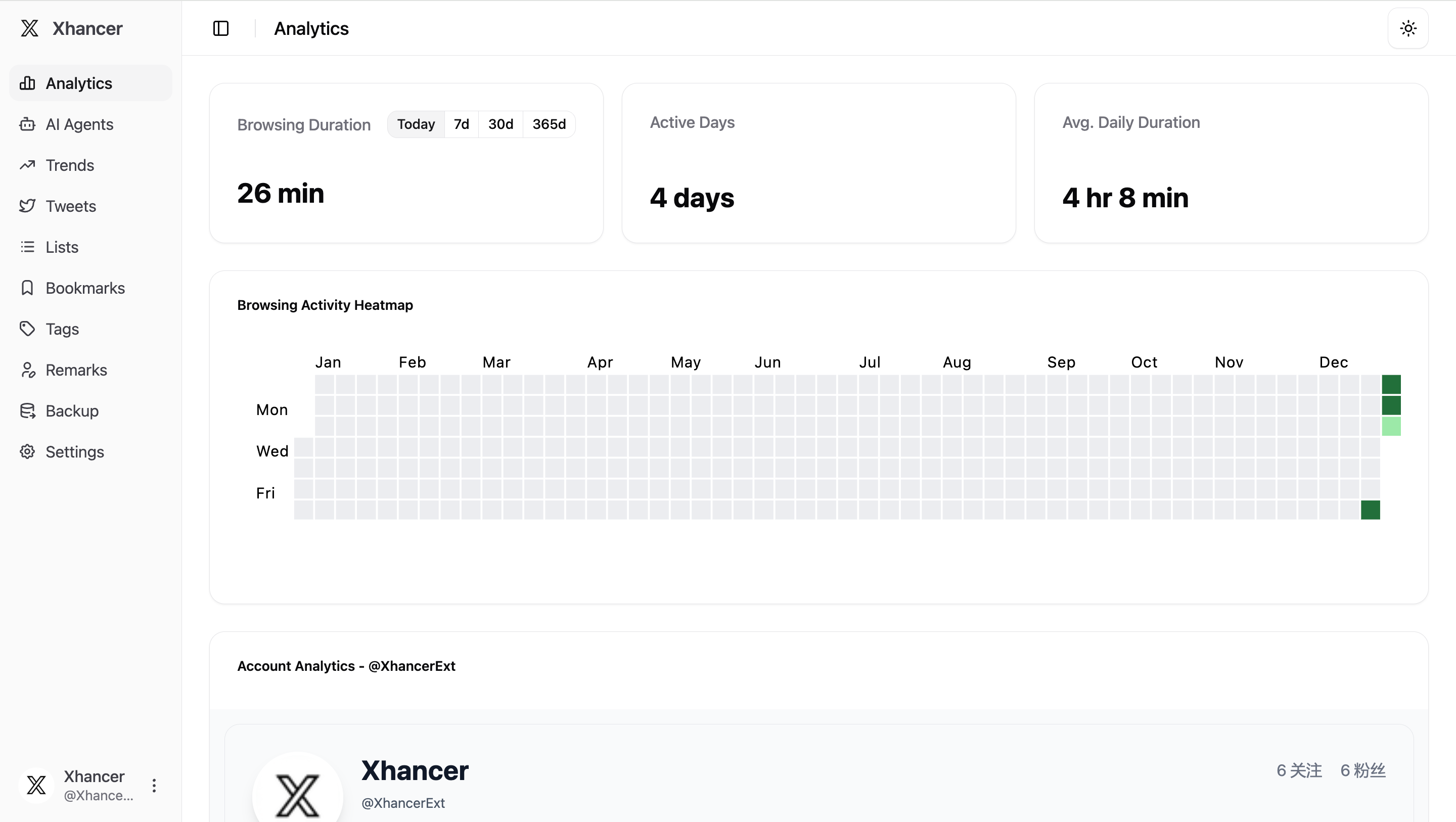
The analytics page displays a calendar heatmap similar to GitHub's contribution graph, giving you an instant visual overview of your X/Twitter usage patterns. See which days you spent the most time scrolling, identify patterns in your browsing behavior, and make informed decisions about your social media habits. For professionals managing their time or individuals working on digital wellbeing, this feature provides the awareness needed to create positive change.
Enhanced Features That Just Work
Beyond the headline features, Xhancer includes thoughtful enhancements that improve your daily browsing:
Video Downloads: Spotted a video you want to save? Xhancer makes downloading videos straightforward, without needing third-party websites or complicated workflows.
Auto-Expand Threads: Tired of clicking "Show more" repeatedly? The extension can automatically expand threads and content, streamlining your reading experience.
Draft Enhancements: Improved draft box functionality helps you manage your tweet drafts more effectively.
Smart Search: Enhanced search capabilities with better filtering and organization.
@ Mention Improvements: The typeahead feature for mentions includes pinyin matching, making it easier to tag users with Chinese names.
Each of these features is toggleable in the settings panel, giving you complete control over which enhancements you want active. Xhancer doesn't force features on you - it adapts to your preferences.
Built for Performance and Privacy
Under the hood, Xhancer is built with modern web technologies using the Plasmo framework, ensuring compatibility with Chrome's latest Manifest V3 standards. This means better performance, enhanced security, and future-proof architecture.
The extension uses React for a responsive interface, TailwindCSS for beautiful styling, and TypeScript for robust, error-free code. But you don't need to worry about the technical details - what matters is that Xhancer feels fast, looks polished, and works reliably.
Supporting both English and Chinese languages out of the box, with seamless i18n integration, Xhancer welcomes users from different linguistic backgrounds. The interface automatically adapts to your browser's language preferences, or you can manually switch in the settings.
Getting Started Is Simple
Installing Xhancer takes just a few moments. Available as a Chrome extension, it integrates seamlessly into your browser without disrupting your existing workflow. Once installed, you'll see new enhancement options appear directly on X/Twitter pages - no need to navigate away or learn complex interfaces.
The options page serves as your central hub, with an intuitive sidebar navigation that gives you access to analytics, tag management, remarks, bookmarks, settings, and data backup options. Everything is where you'd expect it to be, with a clean, distraction-free design that respects your focus.
Your Data, Your Control
One of Xhancer's strongest commitments is to data ownership. Since everything is stored locally in your browser's IndexedDB, you have complete control. Want to export your data? There's a backup feature. Need to import data from another browser? That works too. Want to delete everything? Simply uninstall the extension.
This approach stands in stark contrast to services that lock your data in proprietary formats or require ongoing subscriptions to access features you've already paid for with your attention and personal information.
The Future of Enhanced Social Media
As X/Twitter continues to evolve, so will Xhancer. The extension is actively maintained and regularly updated to ensure compatibility with platform changes and to introduce new features based on user feedback.
Whether you're a casual user looking to organize your bookmarks, a power user managing hundreds of connections, or a professional using X/Twitter for business development, Xhancer provides tools that make sense. It doesn't try to replace the platform - it enhances it in meaningful ways that respect your time, privacy, and workflow.
Social media should work for you, not the other way around. With Xhancer, you're taking back control of your X/Twitter experience, one enhancement at a time.
Related Articles
Explore more about Xhancer's features:
- How to Use User Remarks and Tags in Xhancer
- Complete Guide to Bookmark Management with Xhancer
- Understanding Your X/Twitter Habits with Xhancer Analytics
Learn more about Xhancer at xhancer.com or visit the Chrome Web Store to install the extension today.